Standard vs Detailed vs Extreme: AI Texture Quality Compared
See one animated GLB textured at all three quality levels, with real renders, map resolutions, file sizes, and a practical recommendation.
Detailed is the best default for most finished assets. Standard is the better choice while exploring a look, while Extreme is most useful when a close-up or hero asset can benefit from larger texture maps. Extreme gives you more pixels, but it does not guarantee a better art direction.
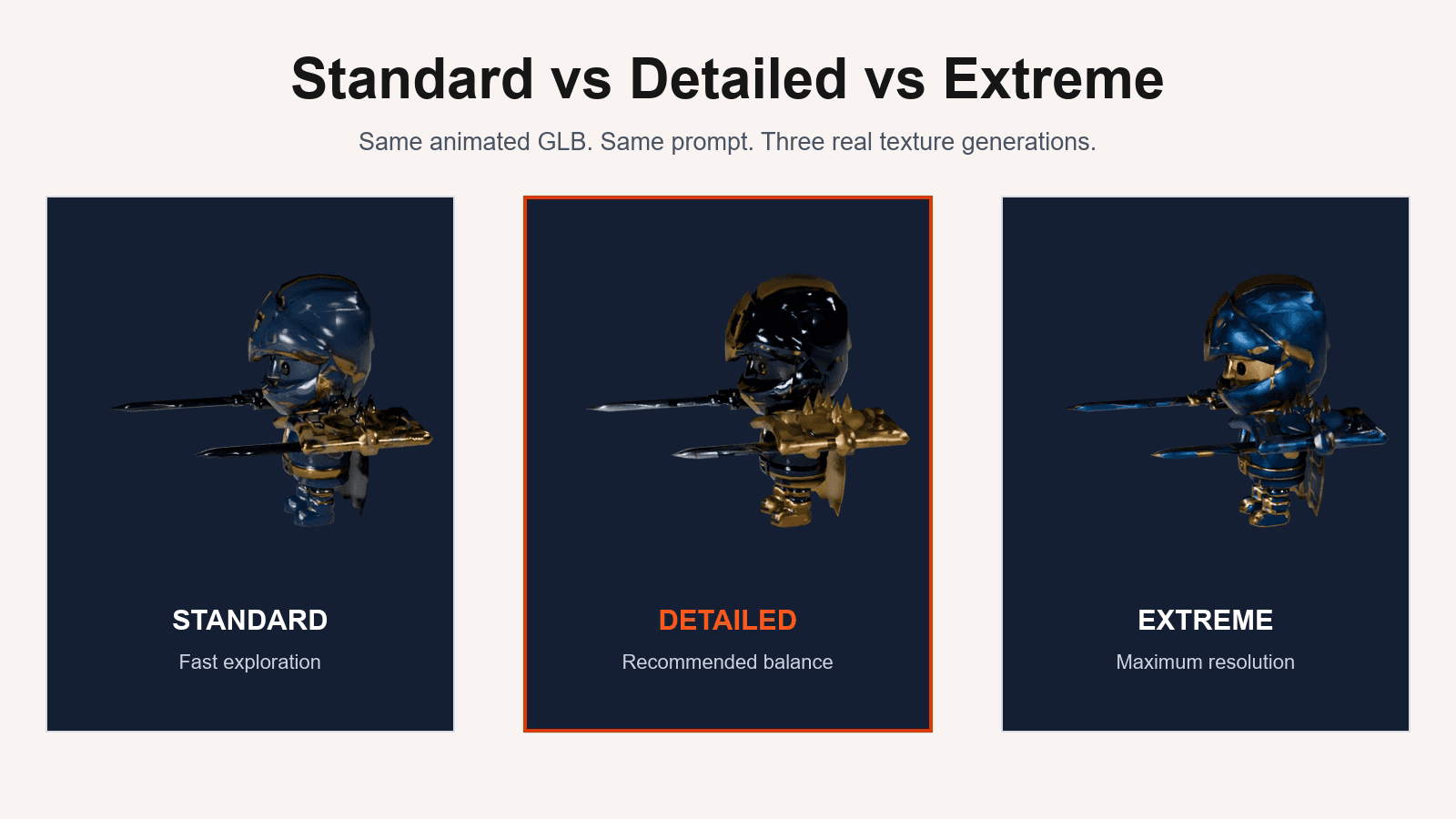
We reached that conclusion by running the same animated knight GLB through Standard, Detailed, and Extreme with the same prompt and generation settings. All three results below are real outputs from the generator.
The short answer
| Quality | Best for | Site cost | Observed map range | Result GLB |
|---|---|---|---|---|
| Standard | Look development and quick iterations | 100 credits | 256px–1024px | 6.26 MiB |
| Detailed | Final textures for most game assets | 150 credits | 512px–2048px | 8.96 MiB |
| Extreme | Hero assets and close inspection | 200 credits | 1024px–4096px | 17.15 MiB |
The map range is not one fixed resolution because this GLB contains 15 materials. Across its 45 embedded PBR images, every map doubled in width and height from one tier to the next.
What we tested
We kept these inputs consistent:
- Source: the same UV-mapped, rigged knight GLB
- Prompt: "Dark royal knight armor, polished black steel, deep blue enamel, rich gold trim, high-contrast fantasy game style"
- Texture alignment, PBR generation, and material baking settings
- Source skeleton, skin weights, and 76 animation clips
We ran one independent generation per quality level. We did not fix the generation seed, which matches the current live product workflow. That means the exact blue, black, and gold treatment also reflects normal generation randomness.
This distinction matters: the resolution, file-size, and animation-preservation measurements are directly comparable. A change in color placement or styling cannot be attributed to the quality setting alone. This is a practical single-asset test, not a statistical benchmark.
Interactive quality result
Same animated GLB and prompt at all three quality levels
Standard quality result
Standard produced 45 embedded PBR images ranging from 256px to 1024px and a 6.26 MiB textured GLB. It retained all 76 animation clips.
Choose Standard when you are still deciding between material directions, colors, or prompt ideas. It is the most economical way to answer, "Is this look worth pursuing?" before spending more credits on resolution.
Detailed quality result
Detailed doubled the dimensions of every embedded map. The maps ranged from 512px to 2048px, and the textured GLB grew to 8.96 MiB. All 76 animation clips remained intact.
This is the strongest default for most finished props and characters. It provides a meaningful increase in texture resolution without the much larger download produced by Extreme.
Extreme quality result
Extreme doubled the map dimensions again, reaching a range of 1024px to 4096px. The resulting GLB was 17.15 MiB, almost twice the size of Detailed, while still retaining all 76 animation clips.
Use Extreme when the asset will appear close to the camera, occupy a large screen area, or needs extra texture resolution for inspection and downstream editing. For small props or distant characters, those additional pixels may increase memory and download size without producing a visible benefit.
Does Extreme always look better?
No. The quality tier controls available texture resolution, not whether the generator chooses your preferred colors or material placement. Prompt quality, the source UV layout, reference imagery, and generation randomness still shape the visual result.
If the first result misses the desired look:
- Revise the prompt or use a clearer reference image.
- Test the new direction with Standard.
- Move to Detailed once the direction is working.
- Use Extreme only when the asset and viewing distance justify it.
This avoids paying for a high-resolution version of an art direction you do not want.
Which texture quality should you choose?
- Choose Standard for prompt testing, style exploration, and simple assets.
- Choose Detailed for the best balance on most production-ready results.
- Choose Extreme for hero assets, close-ups, or high-resolution editing.
Start with the purpose of the asset, not the largest number. You can upload your GLB and compare a quality tier with the expected credit cost shown before generation.
Technical sources
More Posts
How to Make Seamless Textures for 3D Models
Make a texture tile cleanly, check it in Blender, and learn when a seamless image is only one part of a PBR material.

How to Bake Textures in Blender
Bake Base Color, Normal, Roughness, and Metallic maps from a UV-mapped 3D model in Blender, save each image, and avoid common blank or broken bakes.
PBR Texture Maps Explained
Understand Base Color, Normal, Roughness, and Metallic maps and how they work together on a 3D model.